What Must be Reported
After an individual registers as a Permit Consultant, they must e-file a SFEC Form 3410B – Quarterly Report for Permit Consultants by the quarterly due date beginning in the period when they registered and must continue filing until they terminate their status by stopping all activity that requires registration and reporting and by filing a final quarterly disclosure report.
| Due Date | Period Covered |
|---|---|
| April 15 | January 1 through March 31 |
| July 15 | April 1 through June 30 |
| October 15 | July 1 through September 30 |
| January 15 | October 1 through December 31 |
A registered Permit Consultant must file a quarterly report, even if the consultant does not engage in any reportable activity.
When a Permit Consultant also elects to disclose all reportable activity as a Contact Lobbyist, they should use the filing schedule found in the Contact Lobbyist section of the Ethics Commission’s web site.
Information is required to electronically file a registration statement
Identification of Type of Filing
- Original or Amendment
- Date of Original Filing, if the filing is an Amendment
Permit Consultant’s Information
- Permit Consultant’s Name
- Name of Employer
- Business Address
- Business Telephone Number
- Business E-mail Address
Acknowledgement by Permit Consultants Who Also Qualify as Contact Lobbyists
- Checkbox – Check if the Permit Consultant also qualifies as a Contact Lobbyist.
- Checkbox – Check if individual who qualifies as both a Permit Consultant and a Contact Lobbyist is electing to disclose all reportable information on monthly lobbyist reports, instead of the Form 3410B – Quarterly Report for Permit Consultants.
Information about Client(s) with Major or Minor Projects
- Name of Client
- Contact Person for Client
- Business Address
- Business E-mail Address
- Business Telephone Number
- Checkbox to attach Additional Supplemental Sheets to the registration statement to disclose additional clients (if applicable)
Sample filing
Click the image below to preview a form illustrating the information required to be disclosed. (Please note that this form is for viewing purposes only and that the electronic link shown below must be used to file the required information.)
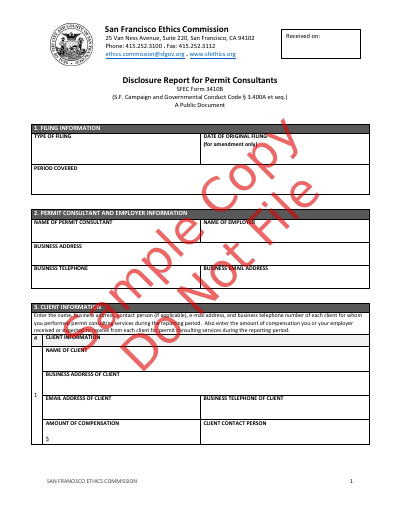
Quarterly Report Form
The SFEC Form 3410B – Quarterly Report for Permit Consultants must be filed electronically through the City and County of San Francisco’s DocuSign system. To begin, use the form access provided below.
The DocuSign filing process includes two steps: completing the form and signing the form. These steps may be completed by one person or shared between two participants.
A staff member or representative may initiate and complete the form, then route it to the permit consultant for signature through DocuSign. After the form is completed and submitted, the permit consultant will automatically receive an email with instructions for providing their electronic signature.
Alternatively, the permit consultant may complete and sign the form independently by entering their information as both the preparer and signer within DocuSign.
File SFEC Form 3410B – Quarterly Report for Permit Consultants
Supplemental Sheet Templates
If there is not sufficient space in the DocuSign Quarterly Form (SFEC 3410B) to report the complete list of clients, contacts with city officers and employees, and contributions, use the templates below to attach additional information to the filing. On SFEC 3410B, check the box to add additional sheets and upload the supplemental list(s). You may use the template in Excel or PDF format to report the additional information.
- SFEC 3410B-AS3 – Client Information Supplemental Attachment (Excel Format)
- SFEC 3410B-AP3 – Client Information Supplemental Attachment (PDF Format)
- SFEC 3410B-AS4 – Contacts With City Officers and Employees Supplemental Attachment (Excel Format)
- SFEC 3410B-AS4 – Contacts With City Officers and Employees Supplemental Attachment (PDF Format)
- SFEC 3410B-AS5 – Political Contributions Supplemental Attachment (Excel Format)
- SFEC 3410B-AS5 – Political Contributions Supplemental Attachment (PDF Format)